

AI Face Swap Tool
Upload any two images and get natural, high-quality results in seconds perfect for fun, creative, or professional edits.
See What the AI Enhancer Can Do
Swap faces in photos with incredible accuracy and realism using our powerful AI Face Swap Tool.
 Before
 After
After
 Before
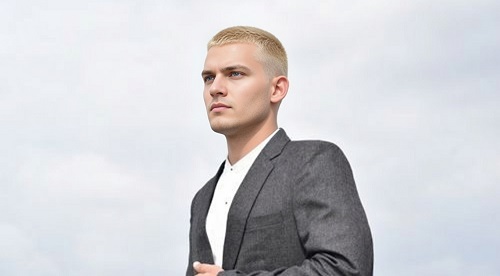 After
After
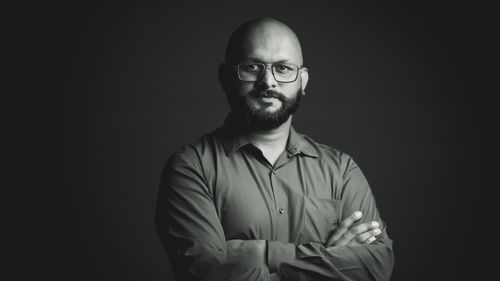 Before
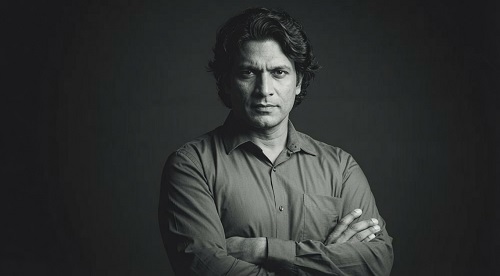 After
After
Swap Faces in Photos Naturally and Instantly
Ever wanted to see how you'd look with someone else's face, put your face on a celebrity, or create fun family mashups? The AI Face Swap Tool on veoaifree.com makes it incredibly easy and realistic. Just upload two photos — one with the source face and one with the target — and the AI swaps them with impressive accuracy.
Whether you're making hilarious memes, creating personalized gifts, visualizing different hairstyles, or producing creative content, it handles skin tones, lighting, angles, and expressions so the result looks natural instead of fake or creepy.
This isn't a cheap filter that pastes one face on another. The AI understands facial structure, matches lighting conditions, and blends everything seamlessly for high-quality, believable swaps.
Ready to Swap Faces?
AI Face Swap Tool - Free
Upload two photos and watch the magic happen
Upload source face • Upload target photoYour photos are processed privately. No watermarks. No sign-up required.
Open the Face Swap Tool →What Makes This AI Face Swap Tool Different
Most face swap tools look cartoonish or leave obvious edges. This one focuses on realistic, high-quality results by paying attention to the important details:
Precise Face Detection
The AI accurately identifies faces even in tricky angles, group photos, or challenging lighting conditions.
Smart Lighting & Skin Match
Automatically adjusts for different skin tones, lighting, and shadows so the swapped face blends naturally with the new environment.
Expression & Pose Preservation
Keeps the original head pose, facial expression, and eye direction for more believable and natural-looking results.
High Resolution Output
Works with clear, detailed photos and delivers sharp, full-resolution swapped images ready for sharing or printing.
Quick Refinements
Not perfect on the first try? Adjust with simple instructions like "make the skin tone warmer" or "improve hair blending."
Multiple Face Support
Swap one or more faces in the same photo — great for group shots or creative multi-person edits.
How to Use the AI Face Swap Tool (Step by Step)
- Open the Tool Head to the AI Face Swap Tool on veoaifree.com. No account or installation needed.
- Upload Your Photos Select a source photo (the face you want to use) and a target photo (the body/scene you want to put it on).
- Choose Swap Options Pick which face to swap if there are multiple, and select any style or quality preferences.
- Generate the Swap The AI processes both images and creates the face-swapped result in seconds.
- Download or Refine Preview the result, make adjustments if needed, and download the final high-quality image.
- Use clear, well-lit photos with good resolution for the best results.
- Front-facing or slightly angled shots work better than extreme side profiles.
- Similar lighting conditions between source and target photos help with more natural blending.
- For group photos, try swapping one face at a time for cleaner results.
- If the first swap is close but not perfect, use follow-up prompts to fine-tune details like hair or skin tone.
Fun & Practical Ways to Use AI Face Swap
Entertainment & Memes
Create hilarious memes, celebrity look-alikes, or funny "what if" scenarios with friends and family.
Creative Projects
Design custom movie posters, book covers, or social media content with your face in unique scenes.
Virtual Try-Ons
See how you'd look with different hairstyles, makeup, or outfits before making real changes.
Personalized Gifts
Make funny or heartwarming custom photos for birthdays, anniversaries, or special occasions.
Why People Love This AI Face Swap Tool
- Surprisingly Realistic Results Advanced AI creates natural-looking swaps instead of obvious cut-and-paste jobs.
- Fast & Unlimited Generate as many swaps as you want with no daily limits or credit system.
- Completely Free No hidden fees, no premium upgrades required for basic use.
- Private Processing Your photos are never stored or shared after processing.
- Easy to Use No technical skills needed — just upload and swap.
- High Quality Output Get sharp, detailed images suitable for sharing anywhere.
Who Uses the AI Face Swap Tool
Content creators & influencers make engaging, shareable videos and posts by swapping faces for humor or storytelling.
Friends & families create funny group photos, couple swaps, or generational mashups for laughs and memories.
Designers & artists experiment with character designs, mockups, and creative concepts quickly.
Marketers & businesses produce personalized ads or fun campaign visuals without expensive photoshoots.
Hobbyists & meme lovers endlessly create entertaining edits and share them online.
Ready to Create Something Fun or Creative?
Turn your ideas into realistic face swaps in just a few clicks. Whether for entertainment, design, or personal projects, the AI Face Swap Tool makes it fast, easy, and surprisingly natural.
Try Face Swap Free Now →