

AI Photo Aging Tool
See how you'll look years from now with realistic AI powered photo aging in seconds.
See What the AI Photo Aging Tool Can Do
Upload your photo and let AI create a realistic glimpse of your future appearance.
 Before
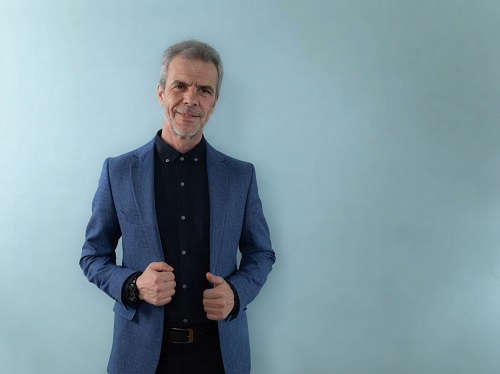 After
After
 Before
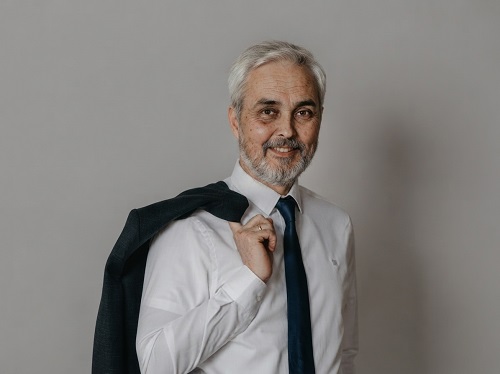 After
After
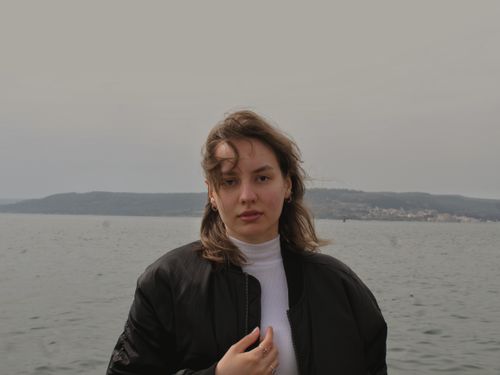 Before
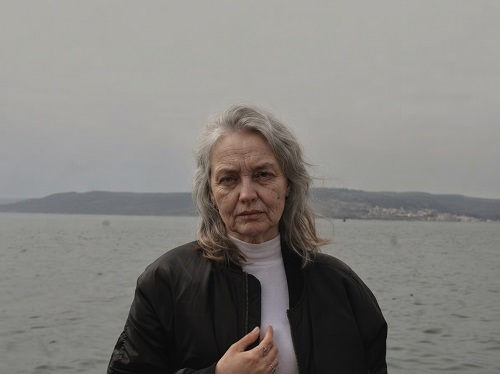 After
After
See How You Might Look in the Future With Realistic Photo Aging
Have you ever looked at an old family photo and wondered what those people would look like today? Or looked at your own picture and imagined yourself twenty or thirty years from now? Most of us are curious about how time changes faces, but guessing is never accurate and professional age progression used to require specialists and a lot of money.
The AI Photo Aging Tool on veoaifree.com makes this simple and accessible. You upload a clear photo and the tool generates a realistic version of how that person could look at an older age. It carefully adjusts skin texture, adds natural lines, changes hair, and updates overall appearance while still keeping the person recognizable.
People use it for fun, for family curiosity, for creative projects, and sometimes just to start interesting conversations. The results feel thoughtful rather than exaggerated, giving a believable glimpse into possible future looks without turning the face into a cartoon.
Ready to See an Aged Version of Your Photo?
AI Photo Aging Tool Free
Upload a clear portrait and choose how many years to age
Upload photo • Select age range or target years (for example 20 years older, 40 years older)Your photos are processed privately. No watermarks. No sign up required.
Open the Photo Aging Tool →What Makes This AI Photo Aging Tool Different
Many aging filters look fake or overly dramatic. This tool focuses on natural and believable changes that still feel like the same person. Here is what stands out:
Realistic Skin and Texture Changes
Adds natural looking lines, subtle texture shifts, and age appropriate skin details without making the face look artificial or heavily filtered.
Hair and Facial Structure Updates
Adjusts hair color, thickness, and style in ways that commonly happen with age while keeping the overall head shape and features consistent.
Preserves Identity
Keeps the person clearly recognizable so the aged version still feels like the same individual rather than a completely different face.
Flexible Age Targets
Choose moderate aging or more significant progression depending on whether you want a small glimpse forward or a longer term view.
Easy Refinements
Request small changes such as softer lines, different hair, or a warmer expression after the first result is generated.
High Quality Output
Produces clear, detailed images suitable for sharing, saving, or using in personal and creative projects.
How to Age a Photo With AI (Step by Step)
- Open the Tool Visit the AI Photo Aging Tool on veoaifree.com. No account or software is needed.
- Upload Your Photo Choose a clear, well lit portrait where the face is easy to see. Front facing or slightly angled photos usually work best.
- Select the Aging Level Decide how many years forward you want to go or choose a general age range.
- Generate the Result The AI creates an aged version of the photo based on realistic patterns of how faces change over time.
- Refine and Download Preview the image, make small adjustments if desired, and download the final high quality result.
- Use a high resolution photo with good lighting and a clear view of the face.
- Avoid heavy shadows, sunglasses, or extreme side profiles for the first attempt.
- Photos of adults generally produce more natural aging than very young children.
- Try different target ages to see a range of possible outcomes.
- If the first result is close but not perfect, ask for small refinements instead of starting over.
Popular Ways People Use the Photo Aging Tool
Personal Curiosity
See a possible version of your future self and share the results with friends or family for fun reactions and conversations.
Family and Generational Fun
Age photos of parents, grandparents, or siblings and compare them with older family pictures to spot similarities.
Creative and Story Projects
Create aged versions of characters or real people for stories, presentations, mood boards, or social media content.
Before and After Comparisons
Generate side by side views that show the original photo next to the aged version for a clear visual contrast.
Why People Enjoy This AI Photo Aging Tool
- Believable Results Focuses on natural changes instead of exaggerated or cartoonish aging effects.
- Fast and Simple Get a finished aged photo in seconds without any editing skills.
- Completely Free Create as many aged versions as you want with no limits or hidden costs.
- Private Processing Your photos are handled securely and not stored after use.
- Keeps the Person Recognizable The core identity stays clear even as age related details are added.
- Fun and Shareable Results often spark interesting conversations and lighthearted sharing.
Who Uses the AI Photo Aging Tool
Everyday users satisfy their curiosity about how they or their loved ones might look in the future and enjoy the reactions that follow.
Families age old photos or current pictures to create fun generational comparisons and conversation starters.
Content creators produce engaging visual posts, challenges, and story content that perform well on social platforms.
Writers and storytellers visualize how characters might appear at different life stages for books, scripts, or personal projects.
Students and hobbyists experiment with visual ideas and explore how faces change over time in a creative way.
Anyone looking for a light and interesting experience simply uploads a photo and enjoys seeing a realistic possible future version.
Take a Glimpse Into Possible Future Looks
Curiosity about how time changes a face is completely natural. The AI Photo Aging Tool lets you explore that idea in a realistic and enjoyable way. Upload a clear photo, choose how far forward you want to go, and see a thoughtful aged version in seconds. It is free, private, and simple to use. Try it today and discover a new way to look at familiar faces.
Age Your Photo Free Now →